WordPress plugin · GPLv2 or later
Free cookie consent plugin for WordPress
The PrivacyPill banner as a plugin: set it up under Settings → Cookie consent, with Accept and Reject side by side, categories, Google Consent Mode v2 and script blocking. No account or licence key needed, and it calls no other server unless you connect an optional PrivacyPill account for a consent log.
v1.2.3 WordPress.org listing pending review
privacypill-consent-banner-1.2.3.zip · 281 kB · WordPress 6.3+ · PHP 7.4+ · tested up to 7.1
Also in:Français
- banner, gzipped
- 8.9 kBbanner, gzipped
- outside requests by default
- 0outside requests by default
- languages
- 6languages
- no account
- €0no account
What it does
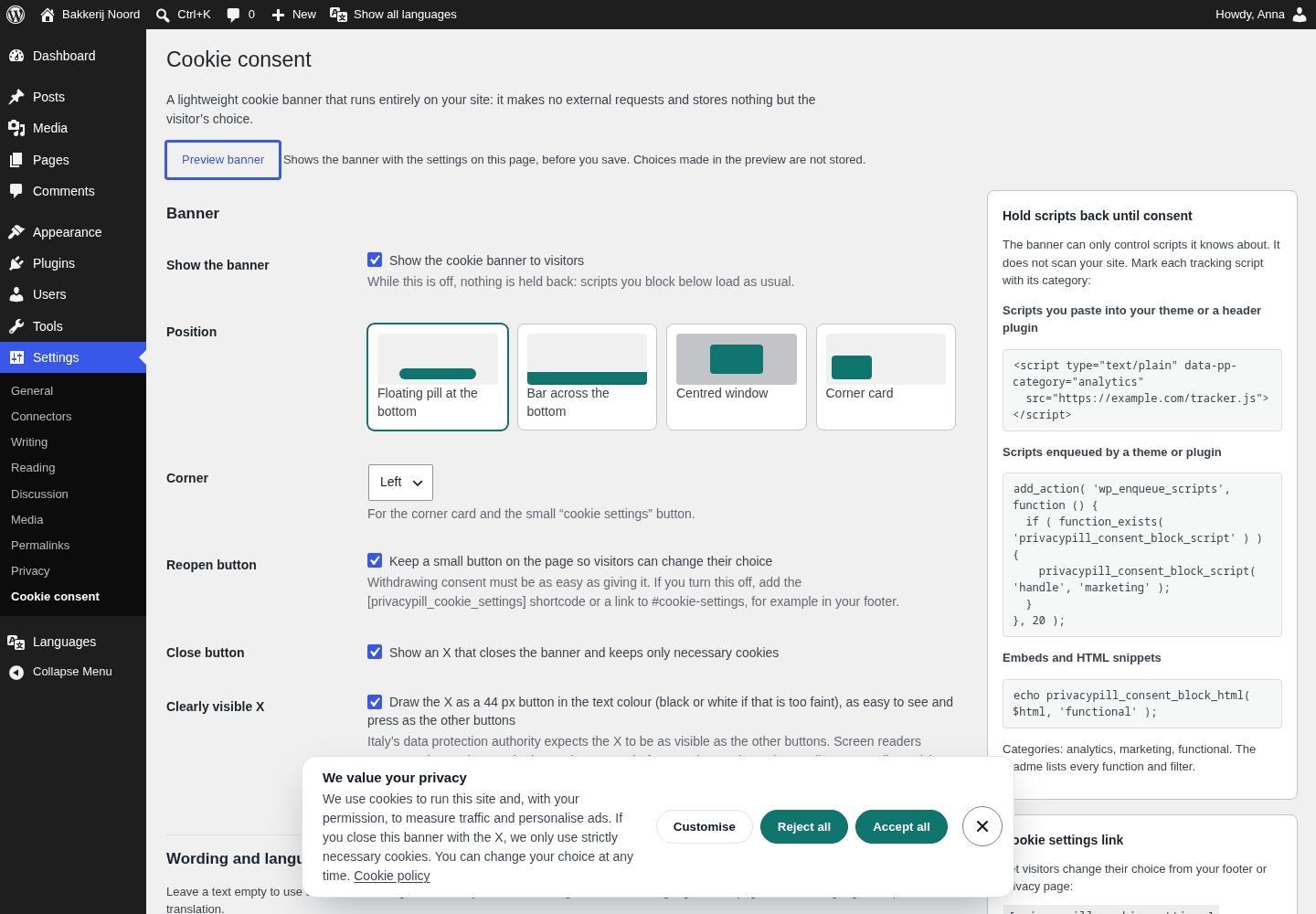
- Settings → Cookie consent: wording, policy link, colours, corner rounding and four positions, with a live preview
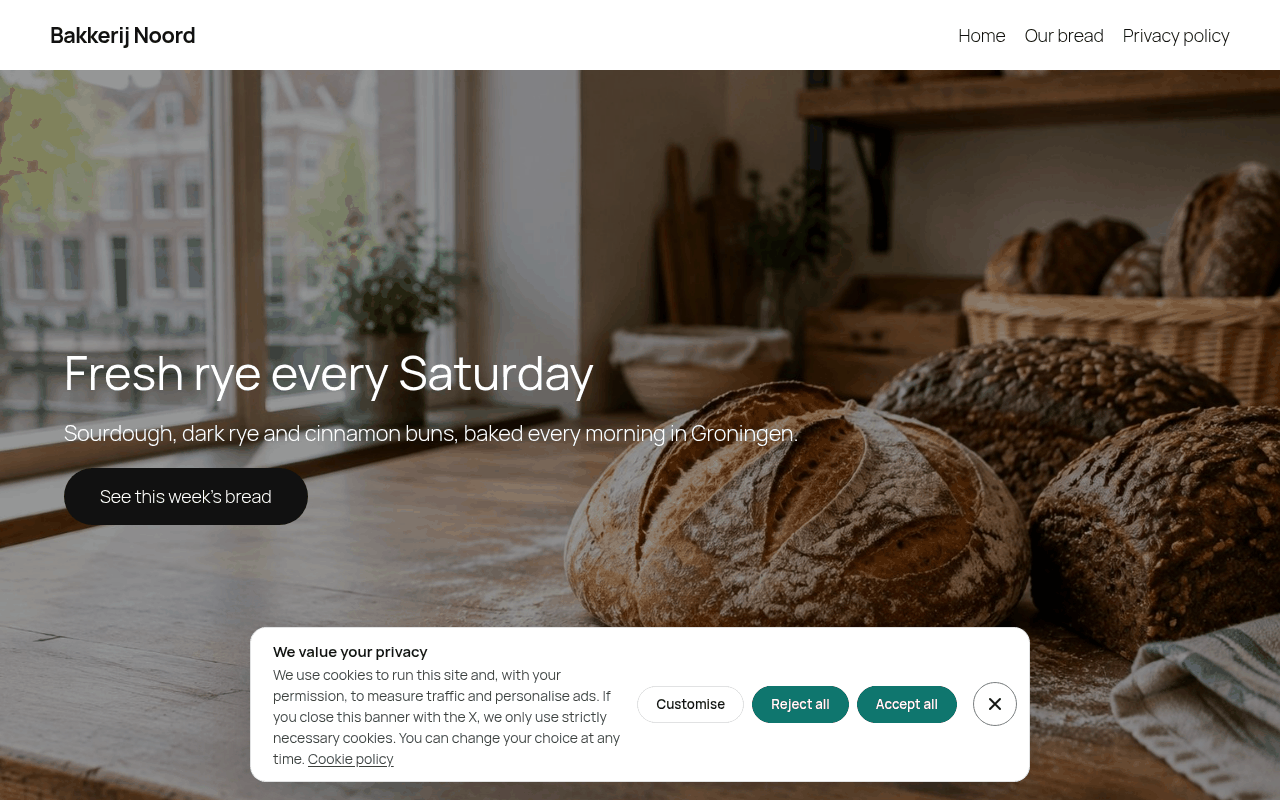
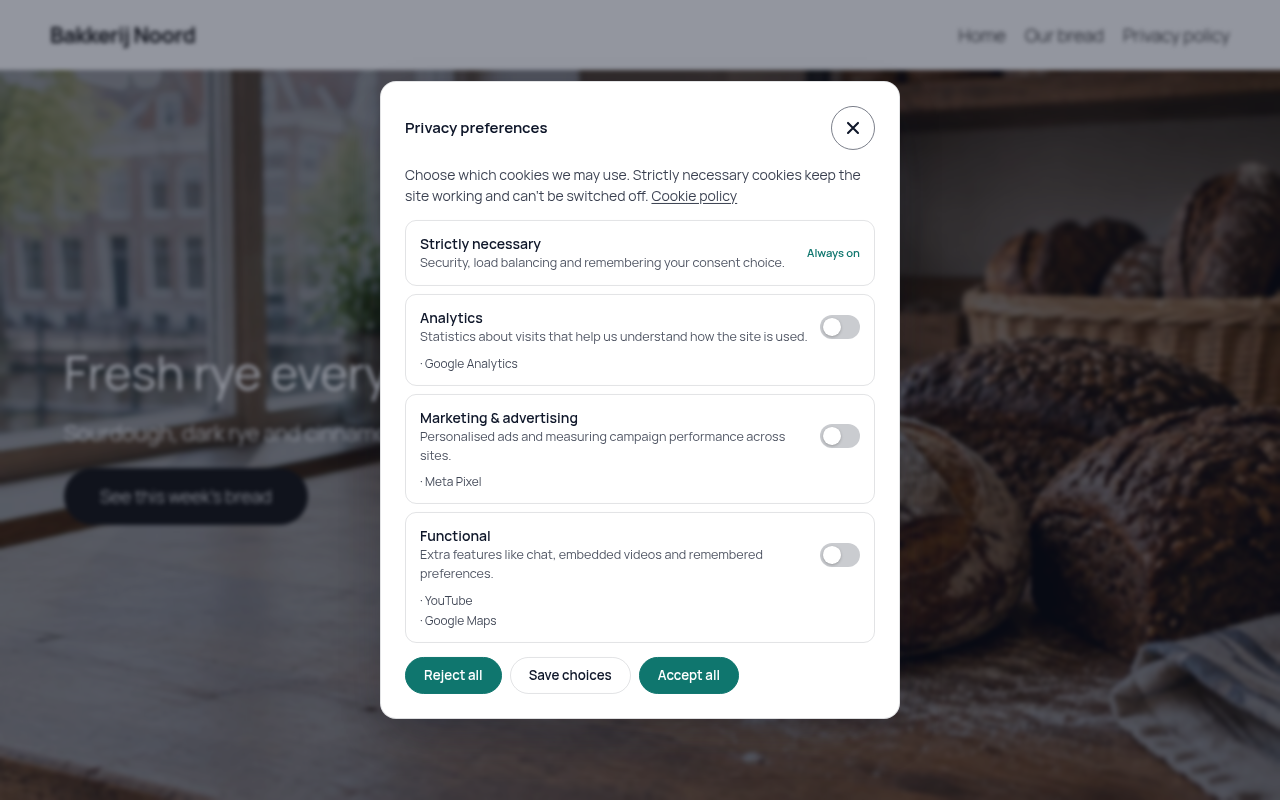
- Accept and Reject side by side with equal weight, and a preferences panel with nothing pre-ticked
- Necessary (always on), analytics, marketing and functional categories; switch off the ones you don't use
- Google Consent Mode v2 defaults printed first in <head>, updated the moment a visitor chooses
- Holds back scripts, iframes, images, video and audio until their category is accepted
- A PHP function and filter API so themes and plugins can block their own scripts
- English, Dutch, German, French, Spanish and Italian, following the page language on WPML and Polylang sites
- Default wording written for each of those languages, with Reject all next to Accept all and a line saying what the X does
- Settings screens in German (formal Sie), Dutch, French, Spanish and Italian when your WordPress admin uses one of them
- Your own banner texts and policy link listed in Polylang's Translations and WPML String Translation, so each language gets your wording and its own policy page
- An optional free PrivacyPill account for a proof-of-consent log, off by default, with exactly what it sends listed on the settings page
- A [privacypill_cookie_settings] shortcode and #cookie-settings links so visitors can change their mind
- Shares choices with the WP Consent API when that plugin is active
- Marked so WP Rocket, LiteSpeed Cache, Autoptimize and Cloudflare Rocket Loader leave it alone
What it doesn't do
- It doesn't scan your site or detect cookies. You mark which scripts belong to which category.
- It doesn't write your cookie policy, and nothing here is legal advice.
- It doesn't keep consent records on a server unless you connect an optional PrivacyPill account. Otherwise the choice lives in the visitor's browser only.
Not sure what your pages load before consent?
Scan your site freeUsing Google Ads or GA4? Check Consent Mode v2
The plugin sets every Consent Mode v2 signal to denied before your Google tags. After installing it, check that the default runs first and what the four signals start as.
Download
Until the WordPress.org listing is approved, this ZIP is how to install it. Check the SHA-256 if you copy the file around.
PrivacyPill Consent Banner 1.2.3
Upload it as is; don't unzip it first. Safari unzips downloads by default, so turn that off or use another browser.
privacypill-consent-banner-1.2.3.zip · 281 kB
SHA-256 a96a8f346972ab249fe36043040fed0c0808a45b306d15a83f268a09317dc9b2
Check the file
The output should match the SHA-256 above.
# macOS or Linux
shasum -a 256 privacypill-consent-banner-1.2.3.zip

# Windows PowerShell
Get-FileHash .\privacypill-consent-banner-1.2.3.zip
Install it
- 1
Upload the ZIP
In your WordPress dashboard go to Plugins → Add New Plugin → Upload Plugin, chooseprivacypill-consent-banner-1.2.3.zipand click Install Now. - 2
Activate it
Click Activate Plugin. If another cookie plugin is active, deactivate it: two banners confuse visitors and each other. - 3
Set it up
Go to Settings → Cookie consent. Pick a position and colours, tick the categories you use and check the policy link; it starts as the privacy policy page from Settings → Privacy. Click Preview banner, then Save Changes. - 4
Hold back the scripts that need consent
Google tags follow Consent Mode by themselves. Mark everything else with its category, as shown below. - 5
Clear caches and test like a visitor
Purge your page cache, then open the site logged out in a private window. No analytics cookies should appear before you choose; try Reject and Accept.
Multilingual sites: Polylang and WPML
The banner shows the language of the page, with built-in wording in English, Dutch, German, French, Spanish and Italian. Your own texts can be translated too:
- 1
Write your texts once
Under Settings → Cookie consent → Wording and language, set the headline, message, buttons and policy link in your main language, and save. - 2
Translate them
With Polylang, go to Languages → Translations and pick the group “PrivacyPill Consent Banner”. With WPML, go to WPML → String Translation (the String Translation add-on is needed) and pick the same domain. Fill in each language, including each language's policy page address, and save. - 3
Check every language
Open the site in each language in a private window. A text you left empty shows the built-in wording of that language, never your main language. After changing a text in the plugin, translate it again.
Optional: keep a consent log
Off by default. Turn it on only if you want proof of consent you can export, and monthly counts of pageviews and choices. The banner keeps using your WordPress settings.
- Create a free PrivacyPill account and add a site with your WordPress domain.
- Copy the site key shown under the domain (it starts with pp_).
- In WordPress, under Settings → Cookie consent → PrivacyPill account, tick “Send consent records and pageview counts to PrivacyPill”, paste the key and save.
What visitors' browsers then send
- On each page view: your site key and whether the visitor already chose.
- When they choose: the random ID from their pp_consent cookie, accept, reject or custom, the categories allowed and the banner revision.
We keep the visitor's country, never the IP address, for 30 days on the free plan or 12 months on paid plans. See the privacy policy.
Hold scripts back until consent
The banner only controls what it knows about. Categories are analytics, marketing and functional; necessary scripts need no change.
Code you paste yourself
<!-- Scripts you paste into your theme or a header plugin -->
<script type="text/plain" data-pp-category="analytics"
        src="https://example.com/analytics.js"></script>
Embeds your theme prints
<?php
// Embeds your theme prints itself (iframes, video, scripts):
echo privacypill_consent_block_html( $youtube_iframe, 'functional' );
Scripts a theme or plugin enqueues
<?php
// Scripts a theme or plugin enqueues: block them by handle.
// Scripts that depend on a blocked handle wait too.
add_action( 'wp_enqueue_scripts', function () {
    if ( function_exists( 'privacypill_consent_block_script' ) ) {
        privacypill_consent_block_script( 'some-tracker', 'marketing' );
    }
}, 20 );

// Or with the filter:
add_filter( 'privacypill_consent_blocked_scripts', function ( $handles ) {
    $handles['some-tracker'] = 'marketing';
    return $handles;
} );
For theme and plugin developers
Wrap calls in function_exists() so your code keeps working when the plugin is off. In the browser, window.PrivacyPill and the privacypill:consent event work as in our install docs, and each choice pushes a privacypill_consent event to the dataLayer.
| Function or filter | What it does |
|---|---|
functionprivacypill_consent_block_script( $handle, $category ) | Holds an enqueued script, and the scripts that depend on it, back until consent. |
functionprivacypill_consent_unblock_script( $handle ) | Stops holding a script back. |
functionprivacypill_consent_block_html( $html, $category ) | Returns the snippet rewritten to load after consent. |
functionprivacypill_consent_has_consent( $category ) | Whether this visitor accepted a category, read from their cookie. Not for pages served from a page cache. |
functionprivacypill_consent_is_active() | Whether the banner shows on this request. |
functionprivacypill_consent_settings_button( $label, $class ) | Returns a button that reopens the preferences. |
filterprivacypill_consent_blocked_scripts | Array of script handle => category. |
filterprivacypill_consent_enabled | Return false to leave the banner off a request. |
filterprivacypill_consent_config | The banner configuration; set any banner option. |
filterprivacypill_consent_gcm_default | The Consent Mode default command, for example to add a region list. |
filterprivacypill_consent_head_priority | The wp_head priority the banner prints at (0). |
On your site
Plugin or hosted PrivacyPill?
Same banner. Hosted PrivacyPill adds the tools around it and works outside WordPress too.
| Feature | WordPress plugin | Hosted PrivacyPill |
|---|---|---|
| Accept, Reject and categories | Included | Included |
| Google Consent Mode v2 | Included | Included |
| Script, iframe and embed blocking | Plus a PHP API for enqueued scripts | Included |
| Settings and live preview | In your WordPress dashboard | Visual editor on PrivacyPill |
| Account or licence key | None needed | Free account |
| Proof-of-consent log and CSV export | With an optional free account | 30 days free, 12 months on paid plans |
| Cookie and tracker scan | Free scan on this site | Manual, plus monthly rescans on Pro |
| Geo-targeting (EU/EEA, UK, Switzerland, California) | Not included | Pro |
| Requests to other servers | None, unless you connect an account | Banner config and consent log |
| Price | Free, GPLv2 or later | Free for 1 site · Pro and Lifetime open soon |
Want hosted PrivacyPill on WordPress instead? Follow the WordPress setup guide. Not on WordPress? The banner is also open source (MIT) as a single file.
Questions
Read the banner's source
The plugin bundles our MIT-licensed banner, readable build included. Its TypeScript source and tests are on GitHub.